
How to Submit a reserve request for a specific customer
Rep will enter XR order type on customer's bill-to account number in OMS mainframe OE0
1. Person making the request to reserve inventory should be entered in the Contact field
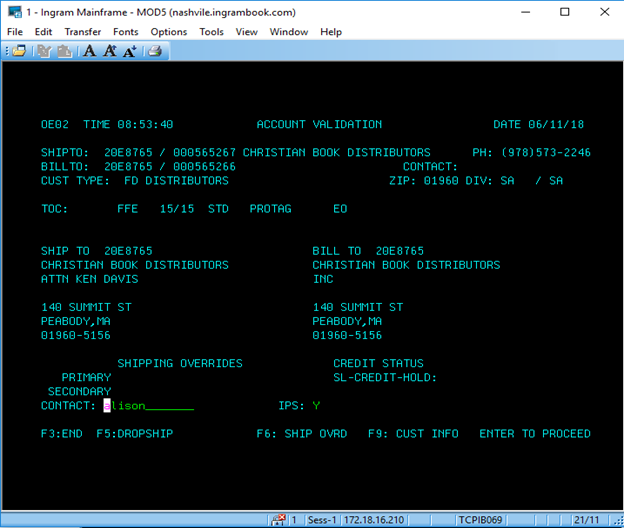
2. Reference information should be added in the PRIM PO field
3. Enter XR in the ORDER TYPE field
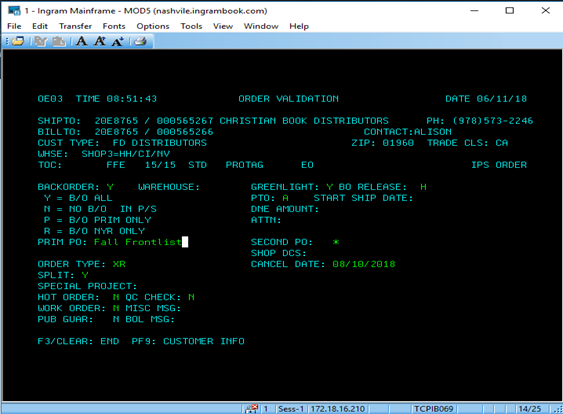
4. Key the specified quantity and EAN just like placing an order. (You can add multiple EAN’s od varying quantities as needed)
If title is out of stock it will backorder you will need to set a priority of an 8 on that line so the reserve will commit first (that will only happen if there are no other orders that have a higher priority) once stock is received.
How to locate and verify a reserve for a specific customer
- IB14 will show the amount reserved in the RESERVE QTY field
- Ingram IQ Product Inventory will show reserved inventory
- Internal Associates can locate Reserves in Qlik by accessing the reserves report.
Comments
0 comments
Please sign in to leave a comment.