
Tracking numbers are available in PKMS before they are visible in OM60/OE60 or ipage. Business Operations Support may utilize PKMS to get tracking information if an order still shows “ON P/L” in OM60.
To locate the tracking number for an order:
- Sign on to the PKMS system
- Choose warehouse
- Choose option 1 — (Pickticket Inquiry)
- Option 1 – (Pickticket Inquiry by PKT CTL #) - press enter
- Type in the OE number and Run number (Ex: 70CLZ455) then tab once and enter 5 (Cartons) –press enter
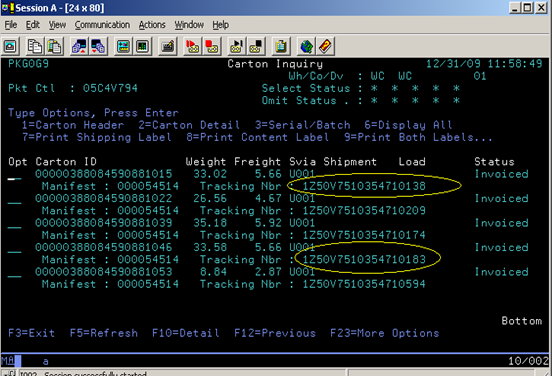
- Press F10 (Details)
- Tracking Numbers are located on right hand side of screen
- See screen shots for examples
Comments
0 comments
Please sign in to leave a comment.