
You may view the status of order to determine if can be canceled or sent through HassleFree Returns. As a reminder, this is offered as a courtesy only and requires supervisor approval. Once approved the Support Coordinator can reach out to the warehouse to cancel or route through Hassle Free
To review the status:
- Sign on to PKMS
- Enter the appropriate warehouse code
- Option 1 — (Pickticket Inquiry) – 9 press enter
- Option 1 – (Pickticket Inquiry by PKT CTL #) - Press enter
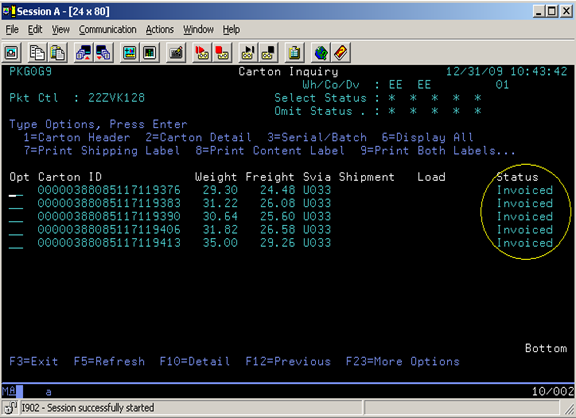
- Type in the OE number and Run number (Ex: 70CLZ455) then tab once and enter 5 (Cartons) –Press Enter
- Reference the Status column located at the right hand side of the page
Pick Ticket Status
10 Unselected (no activity)
15 Preview Wave Selected (run # chosen for packing list)
20 Printed PRINT (ready to be picked)
25 In Picking (in process of being picked)
30 Pick Complete (has been picked and is ready for packing)
35 In Packing IN PACK (in process of being packed)
40 Pack Complete PACKED (has been packed and is ready for manifest)
50 Weighed WGHD (in process of being manifested)
55 In Pack & Hold P&H (in QC for quality check)
60 Manifested MFSTD (has been manifested)
65 Prebill (waiting for manifest to close out and bill)
70 Loaded on Trailer LOADED (on truck and ready for carrier to pick up)
90 Invoiced (has been invoiced)
99 Canceled (order was canceled)
Note:
- Orders may be canceled up to status 10 by contacting the warehouse. Once order is past status 20 it may not be canceled.
- Order may be routed through to HassleFree Returns up through status 40. (only for extreme circumstances). You must call a Supervisor to request this and have it approved.
- Once it is past status 40, order will ship and is unable to be canceled or routed through our HassleFree returns.
Comments
0 comments
Please sign in to leave a comment.